Smartconnectors1401A
All-round material level switch assistant, convenient operation, precise control, making parameter management easy and simple!
Simple operating instructions
RevB2021.07.02
Introduction:
Smartconnectors1401A communicator can be used to check, set, backup and restore parameters of various series of LBSF50/60/70 material level switches.
Its main features are:
1. LCD display measurement values and parameters
2. Modify parameters through key input
3. Small size, easy to carry.
4. USB5V power supply, it can be powered by a computer or mobile phone charger.
5. It can provide 12V power supply for common NPN or PNP type switches, with a maximum power supply current of 60mA.
6. Built-in buzzer, the buzzer sounds when receiving PNP or NPN output switching signal.
7. Parameter download: After modifying a certain parameter, the user needs to download the parameters to the material level switch through a special download menu. When downloading, virtually all parameters will be re-downloaded. Therefore, after modifying multiple parameters, multiple parameters can be updated in one download process.
8. It can accept 12VPWM pulse width modulation signal input and display duty cycle information.
1. Basic parameters:
Overall Dimensions (LxWxH):108x72x25mm
weight: 102g
Power supply: 5V1A
Working current: 100~400mA
Parameter display: LCD
Ambient temperature: -20~70°C
12V maximum output current: 60mA
Internal buzzer operating current: 35mA
Settable instrument: LBSF50/60/70 material level switch
2. Terminals and wiring:
1. Provide 5V DC power supply to Smartconnectors1401A communicator through MiniUSB interface.
2. Smartconnectors1401A communicator provides 12V power supply to NPN or PNP output switches through a 4P KF2EDG5.0 plug-in terminal. Smartconnectors1401A can receive the output signal of the switch and communicate with the switch through another data line.
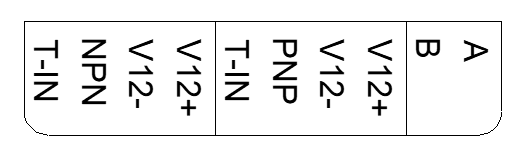
The terminals are divided into 3 groups, from left to right, with the following meanings:
Group | Contains terminals | Function | Remarks |
1 | V12+,V12-,NPN,T-IN | When testing the NPN type material level switch, connect it to the 4 wires of the material level switch. | l V12+: 12VDC+ (white) l V12-: 12VDC- (green) l NPN: NPN output line of material level switch (yellow) l T-IN: Data line of material level switch (brown) |
2 | V12+,V12-,PNPT-IN | When testing the PNP type material level switch, connect it to the 4 wires of the material level switch. | l V12+: 12VDC+ (white) l V12-: 12VDC- (green) l PNP: PNP output line of material level switch (yellow) l T-IN: Data line of material level switch (brown) |
3 | A, B | RS485 | Function not implemented yet |
3. Buttons and indicators:
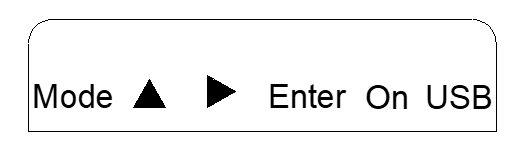
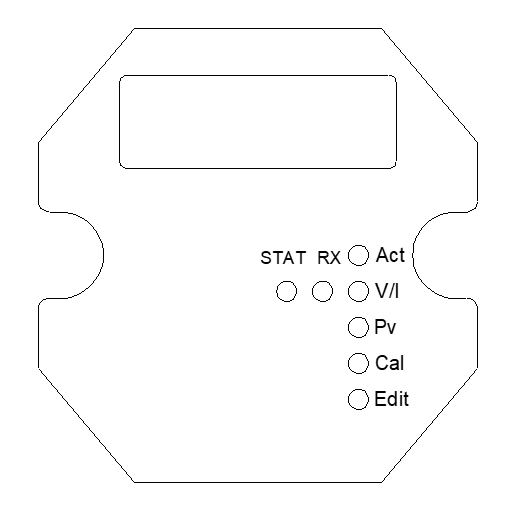
Button | Function |
On | Power switch button l One click to boot l Press and hold for 6 seconds to turn off |
Mode | Click the Mode button to switch working mode There are 5 working modes in total Act: Download parameters, unlock and other functions V/I: Displays the current operating voltage and operating current of the material level switch. Pv: Display the internal parameters of the current material level switch Cal: calibration material level switch Edit: Modify the parameters of the material level switch. Note that after modifying the parameters here, it will not take effect until downloaded using d-ALL, d-Ad1, d-Id and other menus. |
Up | When scrolling forward through the menu, or when modifying parameters, the current digit is incremented by 1. |
Right | Scroll backward through the menu, or when modifying parameters, move the cursor to the right. |
Enter | Enter the current menu, perform a specific function, or modify a parameter. |
Indicator light | Meaning |
STAT | After the communication connection between the communicator and the material level switch is successful, it will always light up. |
RX | Each time the material level switch uploads information, it flashes once. |
Act | The communicator is in Act command working mode |
V/I | The communicator is in voltage and current measurement mode |
Pv | The communicator is in display mode, displaying the current measurement value and parameter value of the material level switch in real time.2‑, some parameters can be modified and downloaded directly by clicking the Enter key. |
Cal | The communicator is in calibration mode, used to calibrate the material level switch |
Edit | The communicator is in edit mode and can be used to edit and modify the parameters of the material level switch.1 |
1. Attention!: In Edit mode, after the parameter modification is completed, it will not take effect automatically. You must use the download command to download the parameters before it will take effect.
2. The material level switch will not automatically upload data. Only after it is unlocked, the measured values and parameters will be automatically uploaded periodically.
4. Each mode and its submenu functions:
1. Use the right button to switch submenus in the current mode
2. Use the Mode button to switch to the next mode
3. Use the Enter button to start modifying the current menu parameters or executing menu commands.
4. When modifying and editing, click the Mode button to cancel the modification and enter the next menu.
Working mode | Submenu type (whether editable) | Introduction to submenu functions |
Act | l Command menu l Not editable, l Click Enter to enter, click Confirm again and perform the corresponding action. | 1. Unloc unlocks the material level switch and establishes communication. 2. bkUp material level switch backs up current parameters 3. Restore the factory parameters of rESto material level switch |
V/I | l Real-time measurement menu l Not editable | 1. UCurrent material level switch operating voltage (V) 2. mA current material level switch operating current (mA) 3. d. The pressure drop loss of the current material level switch PNP or NPN alarm output. |
Pv | l Real-time measurement menu l Not editable | 1. P1000: Current measured value of material level switch (0~1000) 2. FPV: frequency value 3. MAMP: signal amplitude value 4. do: output mode (NPN or PNP) l 0:NPN l 1:PNP 5. Wind0: Alarm window starting value 6. Wind1: Alarm window end value 7. Whyst: Alarm return error 8. dly: Alarm delay (0~10) 9. dAmP: Damping (0~5) 10. Ecode: Fault code (normal 4001 or 6001) 11. uptk: Upload information speed 12. FAir: Zero point calibration information of material level switch 13. F_Med: Full range calibration information of material level switch 14. Trigr: trigger strength 15. Sig1, Sig2, Sig3, Sig4, Sig5, Sig6 diagnostic information 16. Code: product code of material level switch 17. Perod: PWM period 1=0.1S, 10=1S 18. dAC: Sampling accuracy of material level switch 19. TCoEF: Temperature compensation coefficient of material level switch |
Cal | 1. Command menu 2. Not editable, 3. Click Enter to enter, click Confirm again and perform the corresponding action. | 1. Empty: The material level switch starts empty tank learning, and the probe is required to be in the air and not in contact with the medium. 2. Full: The material level switch starts full tank learning, requiring all probes to be immersed in water. 3. First, the empty tank is learned, and then the full tank is learned. After the command is completed, the material level switch will automatically set the appropriate alarm interval. |
Edit | 1. Parameter menu 2. Can be edited and modified 3. Click Enter to start modification. After modification is completed, click Enter again to save. | 1. Windo: starting point of alarm window (0~1000) 2. Wind1: End point of alarm window (0~1000) 3. Whyst: Hysteresis of alarm window (0~100) 4. do: output mode l 0: represents NPN output mode l 1: Represents PNP output mode 5. dLy: Alarm delay (0~10) 6. dAmP: damping (0~3) |
5. Examples of common operating steps:
Example 1: Test the material level switch alarm function of NPN output (LBSF50/60/70 type)
1. Power on:
l The Smartconnectors1401A CommunicatorThe first group of terminals (V12+, V12-, NPN, T-IN)It is reliably connected to the material level switch through a 4P plug-in terminal. Use the USB data cable to power the SMARTCONNECTORS1401A communicator and click the "On" button to turn it on. After powering on, the communicator screen displays Unloc and the Act status indicator light is on.
2. Alarm function:
l The material level switch is immersed in water (or held firmly by hand), causing the switch to alarm and the indicator light of the switch to light up. At this time, the internal buzzer of the Smartconnectors1401A communicator should sound, indicating that the switch is currently working normally.
Example 2: Test the material level switch alarm function of PNP output (LBSF50/60/70 type)
1. Power on:
l The Smartconnectors1401A CommunicatorThe second set of terminals (V12+, V12-, PNP, T-IN)It is reliably connected to the material level switch through a 4P plug-in terminal. Use the USB data cable to power the SMARTCONNECTORS1401A communicator and click the "On" button to turn it on. After powering on, the communicator screen displays Unloc and the Act status indicator light is on.
2. Alarm function:
l Immerse the material level switch in water (or hold it firmly with your hand), causing the switch to alarm and the switch indicator light to light up. At this time, the buzzer inside the Smartconnectors1401A communicator should sound, indicating that the switch is currently working normally.
Example 3: Check the PV and internal parameters of NPN output type material level switch (LBSF50/60/70 type)
1. LBSF50NPN output type material level switch requires a 1.2K ohm pull-up resistor in parallel between the V12+ and T-IN terminals for normal communication. PNP type does not need this resistor.
2. Power on:
l The Smartconnectors1401A CommunicatorThe first group of terminals (V12+, V12-, NPN, T-IN)It is reliably connected to the material level switch through a 4P plug-in terminal. Use the USB data cable to power the Smartconnectors1401A communicator and click the "On" button to turn it on. After powering on, the screen displays Unloc and the Act status indicator light turns on.
3. Unlock:
l After startup, the Act indicator light turns on and when the screen displays Unloc, click the Enter key and the Unloc character starts to flash. Click the Enter key again to confirm and start to unlock the material level switch. The unlocking time is usually more than 10 seconds.
l After the unlocking is successful, the RX communication indicator light of Smartconnectors1401A flashes periodically and the STAT indicator light is always on.
l After successful unlocking, Smartconnectors1401A automatically reads the parameters of the material level switch and saves them in the Edit storage area for further adjustment and modification by the user.
4. View parameters:
l Click the Mode button several times until the Pv indicator light turns on and the Smartconnectors1401A communicator begins to display the internal parameters of the switch.
l Click the back or up button to switch between different parameters. The most important parameters are:
l P1000: Current measurement value of the probe (range: 0~1000)
1. Calibrated meter, in air: P1000≈100.
2. After calibration, the meter is in water, P1000≈800.
l Wind0: starting point of the alarm window (alarm values for water, oil, and solid powder are different)
l Do: Output mode (0=NPN or 1=PNP)
l DLy: Alarm delay: 0~10
l DAmP: Damping: 0~3
l Wind1: The end value of the alarm window (usually 1000, no need to change)
Example 4: Modify the Wind0 parameter value of the starting point of the alarm window of the material level switch output by NPN (LBSF50 type)
1. Power on:
l Place the SMARTCONNECTORS1401A communicator'sThe first group of terminals (V12+, V12-, NPN, T-IN)It is reliably connected to the material level switch through a 4P plug-in terminal. Use the USB data cable to power the SMARTCONNECTORS1401A communicator and click the "On" button to turn it on. After powering on, the communicator screen displays Unloc and the Act status indicator light is on.
2. Unlock:
l After startup, the Act indicator light turns on and when the screen displays Unloc, click the Enter key and the Unloc character starts to flash. Click the Enter key again to confirm and start unlocking the instrument. The unlocking time is usually more than 10 seconds.
l After the unlocking is successful, the RX communication indicator light of Smartconnectors1401A flashes periodically and the STAT indicator light is always on.
l After successful unlocking, Smartconnectors1401A automatically reads the parameters of the material level switch and saves them in the Edit storage area for further adjustment and modification by the user.
3. View the starting point value of the current alarm window Wind0
l Click the Mode button several times until the Pv indicator light turns on. Continue clicking the Back button to switch between different parameters until the screen displays Wind0.
l Wind0Common settings:
n Water: 550
n Bubbles: 300
n Thick medium (e.g. pasta sauce): 790
n Grease: 250
n Solid particles (e.g. dried tea leaves): 160
4. EditWind0:
l In PV mode, when the screen displays Wind0, click the Enter key to start modifying the Wind0 value.
l Use the right key to move the cursor and the up key to modify the current digit.
l After the modification is completed, click the Enter key to save. The screen prompts Yes. Click the Enter key again to confirm and start downloading.
l The download usually lasts for more than 10 seconds. After the download is completed, the RX communication light starts to flash and the STAT light will also be on. If the modification is successful, PASS will be displayed on the screen.
Example 5: Change the alarm delay of NPN type material level switch from 0 seconds to 3 seconds (LBSF50 type)
1. Power on:
l Place the SMARTCONNECTORS1401A communicator'sThe first group of terminals (V12+, V12-, NPN, T-IN)It is reliably connected to the material level switch through a 4P plug-in terminal. Use the USB data cable to power the SMARTCONNECTORS1401A communicator and click the "On" button to turn it on. After powering on, the communicator screen displays Unloc and the Act status indicator light is on.
2. Unlock:
l After startup, the Act indicator light turns on and when the screen displays Unloc, click the Enter key and the Unloc character starts to flash. Click the Enter key again to confirm and start unlocking the instrument. The unlocking time is usually more than 10 seconds.
l After the unlocking is successful, the RX communication indicator light of SMARTCONNECTORS1401A flashes periodically and the STAT indicator light is always on.
l After successful unlocking, SMARTCONNECTORS1401A automatically reads the parameters of the material level switch and saves them in the Edit storage area for further adjustment and modification by the user.
3. View the current alarm delay
l Click the Mode button several times until the Pv indicator light turns on. Continue clicking the Back button to switch between different parameters until the screen displays dLy.
4. Edit dLy:
l In PV mode, when the screen displays dLy, click the Enter key to start modifying the dLy delay parameters.
l Use the right key to move the cursor and the up key to modify the current digit. The delay is 3 seconds, which should be changed to 3 here.
l After the modification is completed, click the Enter key to confirm. The screen prompts Yes. After clicking the Enter key again to confirm, the download will start.
l The download usually lasts for more than 10 seconds. After the download is completed, the RX communication light starts to flash and the STAT light will also be on. If the modification is successful, PASS will be displayed on the screen.
5. Turn off the power to the material level switch and then turn it on again (turn off the upload of diagnostic information to prevent it from affecting the delay length).
6. Testing
l Immerse the material level switch probe in the water (or hold it tightly with your hand), and then remove it from the water to determine whether the alarm delay is normal.
6. Frequently Asked Questions about SMARTCONNECTORS1401A Communicator
Symptoms | Possible reasons | Treatment method |
RX indicator light does not flash | Wiring problem Material level switch is not unlocked After the material level switch is unlocked for 300 seconds, it will automatically relock. | Check wiring Check whether the power supply of the material level switch is 12V Use the communicator to re-unlock the material level switch |
After connecting the material level switch, the communicator screen suddenly turns dark. | There may be a short circuit between the positive and negative power lines of the material level switch.The material level switch may be faulty and the working current may be too large, causing the communicator to fail to work properly. | 1. In the V/I mode of the communicator, check the operating voltage and current. The normal voltage is about 12V, and the operating current fluctuates between 4~40mA. 2. Replace a material level switch for testing. 3. Check the wiring. |
SMARTCONNECTORS1401A screen displays Err1 or Err2 | Power supply is less than 5V SMARTCONNECTORS1401A internal hardware failure | Power on and restart SMARTCONNECTORS1401A. During the startup process, the screen will display 2 numbers, such as 1181,731, representing the output voltage. SMARTCONNECTORS1401A will alarm if the output voltage exceeds the limit. Record the screen data when power is turned on and notify the manufacturer's technical personnel. |
NPN type material level switch cannot communicate | Poor contact of pull-up resistor Or the resistance value is inappropriate | 1. Check whether the pull-up resistor is 1.2K 2. Check whether the pull-up resistor is in the correct position and well connected. |
After the material level switch probe comes into contact with water and the alarm is released, the alarm cannot be cleared after it is separated from the water. | 1. The 5VUSB power supply voltage of the communicator is insufficient. 2. The working current of the material level switch is too large, resulting in insufficient power supply to the communicator. | 1. Check or replace a USB charger. 2. If using a power bank, check whether the battery is low 3. Use a USB cable with better quality (lower resistance). 4. Replace a material level switch for testing. |
7. SMARTCONNECTORS1401A communicator diagnostic information
To facilitate on-site diagnosis, the communicator will first display several important parameters and measured values after unlocking the material level switch. These include:
l Product CodeCode
l Software version number VER
l Output format (NPN/PNP)
l Internal measured value FPV
l Signal strengthMAMP
Users can take a short video of the information displayed on the screen after unlocking and send it to the manufacturer's technology to quickly locate the problem.
8. Appendix
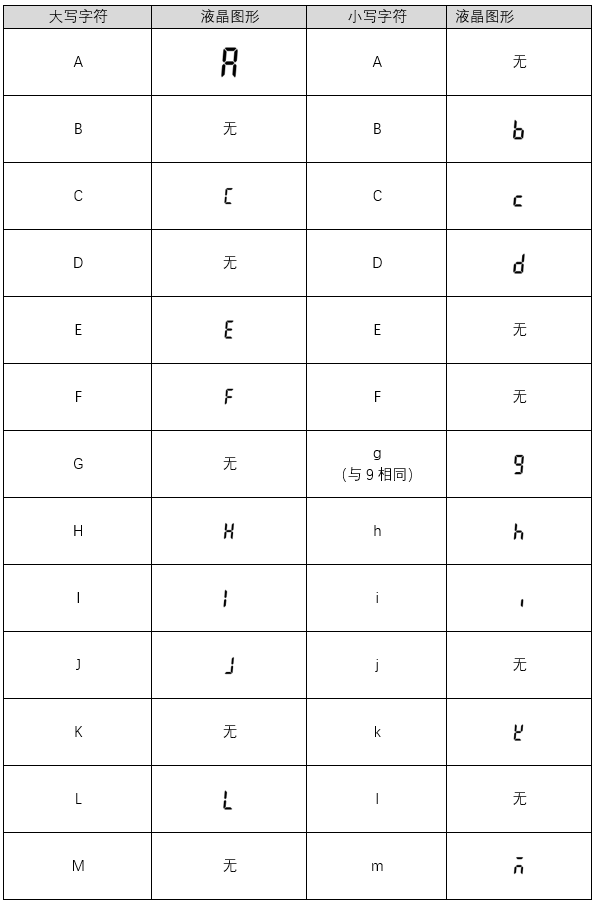
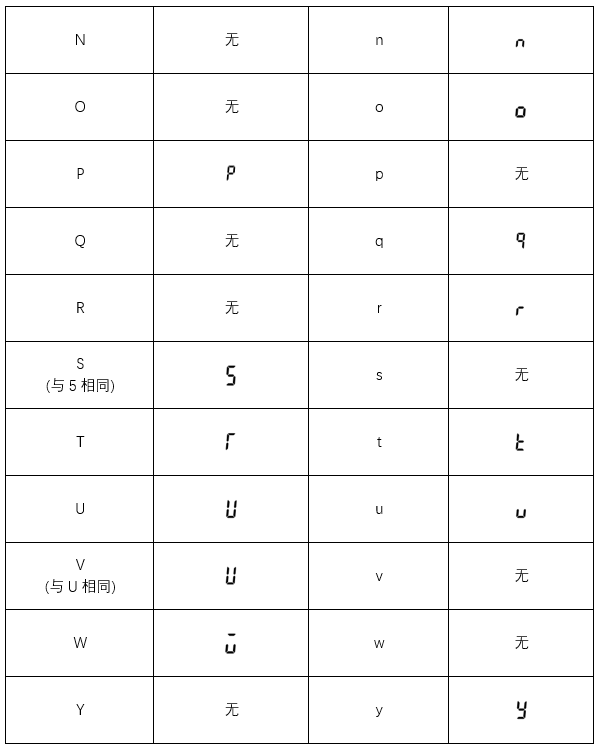
LCD graphics-character comparison table





 Home
Home


