This article aims to briefly and directly introduce the installation essentials and debugging methods of the external clamp-on ultrasonic flow meter.
Step 1 Installation tool preparation
Angle grinder, 1 set, with polishing disc, used for polishing pipe surfaces
Wire stripper, 1 piece
Paint pen, 1 piece
1 measuring tape,
1 flat-blade screwdriver with a wide mouth, 1 medium-sized Phillips screwdriver, and 1 small-sized screwdriver, used to tighten the screws of the wiring board and the clamp screws
1 utility knife, which can be used for stripping wires on site
1 bag of lubricating butter. After installation, apply the pipe to prevent rust.
Step 2 Preparation before installation
When unpacking, first find out the 2 sensors.
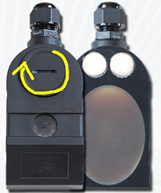
Use a cross-blade screwdriver to unscrew the sensor's junction box, pass the two sensor cables that come with it through the waterproof cap, strip them, and connect them.
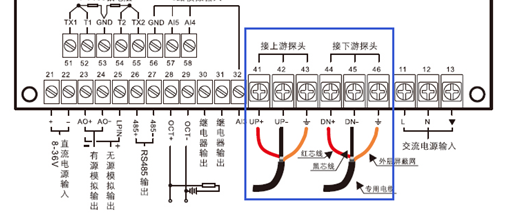
Red is connected to positive, black is connected to negative,
Then lock the waterproof cap. Lock the sensor junction box. Use a marker to make a mark on the sensor and the end cable so that you can know the corresponding wire end of the sensor after threading the pipe.
There should be a 220V power supply on site and connected to the 220V power supply.You can first find a socket in the office to test the machine and see if it lights up.
Step 3 Preparation for on-site installation
The first step is to find a suitable installation location.The core requirement is that the front and rear straight pipe sections must be sufficient, with a space of 15 times the pipe diameter in the front and a length of 10 times the pipe diameter in the back.
For example: DN200, the installation point needs to be 3 meters in front and 2 meters of straight pipe section behind.
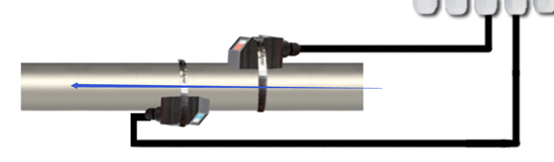
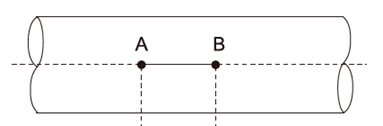
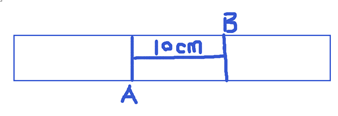
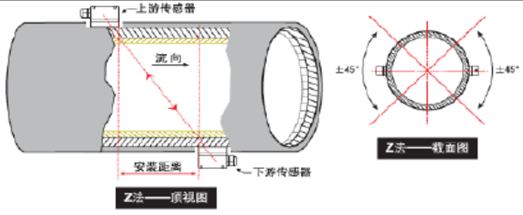
Mark lineAs shown in the picture above, first take out the tape measure directly above the suitable installation point and follow the pipe.Draw a straight line,The length is half the diameter of the pipe to determine the front and back position of the probe,
Use a polishing machine, polish the left and right sides of the pipe. The metal color of the pipe should be polished and shiny. The polished area should be 6-200px in diameter for fixing the sensor.
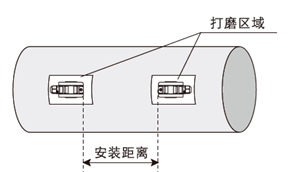
After polishing, draw surrounding lines at a 90° vertical angle at both ends of the line you just drew to determine the center position of the sensor on the left and right sides, and mark them. (The sensor is installed in the middle of both sides of the pipe, with the probes in front and behind, and the distance is half of the inner diameter of the pipe.)
For example, the DN200 drawing is 250px long, and the DN250 drawing is 312.5px long.
Step 4 Sensor installation
No matter which sensor is installed first, pay attention to the picture below,Check whether the direction of the cable and the probe are correct as shown in the picture. The blue arrow is the direction of the fluid.
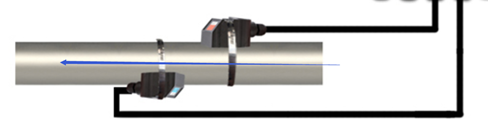
Hoop installation,
During installation, first thread the two hoops on the pipe, leaving a gap for the sensor to be inserted.
Open the hoop first, leaving about the same gap, then buckle the hoop buckle and lock it properly.
Sensor installation,
1. Apply the coupling agent that comes with the package, something like toothpaste, to a thickness of 75px on the transparent part of the sensor probe.
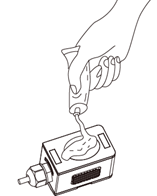 Then, after determining the direction, fix it directly facing the pipe, move it to the appropriate position, and buckle the hoop. Lock the hoop properly to prevent it from slipping.Be especially careful not to pick up the probe repeatedly. The probe and the pipe are sealed by coupling agent. If air enters, the coupling effect will be reduced. The signal may not be detected, or the signal may not be strong enough.
2. After the two probes are installed, reconfirm the installation distance between the front and rear probes. See the figure below for the exact distance determination method.
Cable ducting
Remember to mark the sensor cable when threading it through the pipe so that you can identify which probe corresponds to which cable. This avoids confusion when preparing to connect the meter to the sensor cable.
Step 5 Installation and fixation of converter
Find a suitable place on site to install the converter. The converter has a high protection level. When all screws and joints are locked, it can reach the IP67 protection level. It can be installed outdoors directly without an instrument box, or it can be installed in the instrument box.
Step 6 Wiring
Before starting wiring, make sure all power sources are turned off to avoid electric shock and avoid live wiring.
sensor wiring
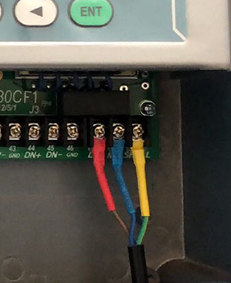
Find the sensors that are well marked to distinguish between the front and rear, or upstream and downstream, and connect them respectively. Refer to the wiring diagram below. The shielded wire can be connected or not.
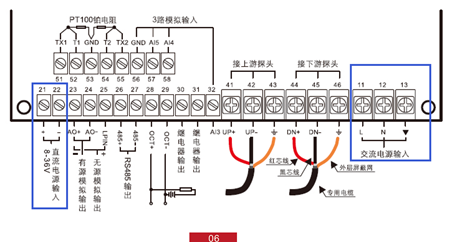
Power wiring, the instrument supports AC 220V or DC 24V power supply, but you can directly choose one of the two.
Step 7 Debugging
The core content of debugging is to confirm the quality of the ultrasonic signal of the sensor and find the optimal signal.
Status judgment after the instrument is powered on
After the instrument is powered on, first observe whether there is flow. If there is no flow, start the debugging process.
Menu operation instructions
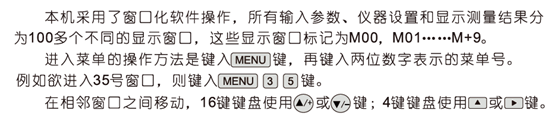
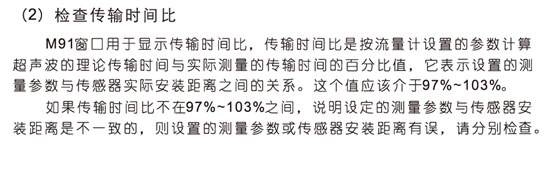
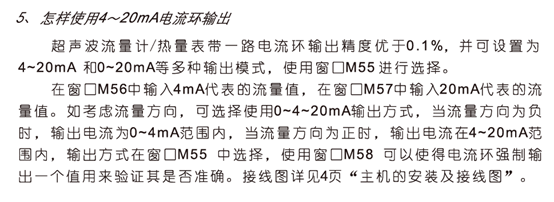
According to the above method, first enter menu No. 90 and No. 91, query the current status, and decide how to optimize
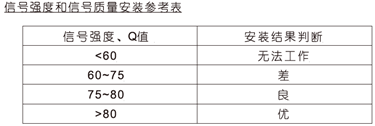
Menu No. 90Used to compare the difference between the profit value and the actual value. 0 means no signal, 99 means the maximum strength signal. The signal must be basically greater than 60% to work well.
The optimization method is to adjust the front and rear distance of the sensor,Appropriate fine-tuning, to make this value reach 75% or above.
Others
For more questions, please directly consult Doweston service engineers at +1 (314) 325-4420
Or visit the official websitewww.doweston.cnSeek technical support





 Home
Home


