Contact Us+1 (314) 325-4420 English

Tel: +1 (314) 325-4420

Service hours: Mon-Fri 9:00-17:30

Get My Quote

Global Sites Member Center
Home > News > Technical Support

Smart Switch Operation Guide: Measuring and Modifying Level Control DK Values

📍 📅
Source:Doweston Flow Meter Technology Research Center
2023-03-27 Back List


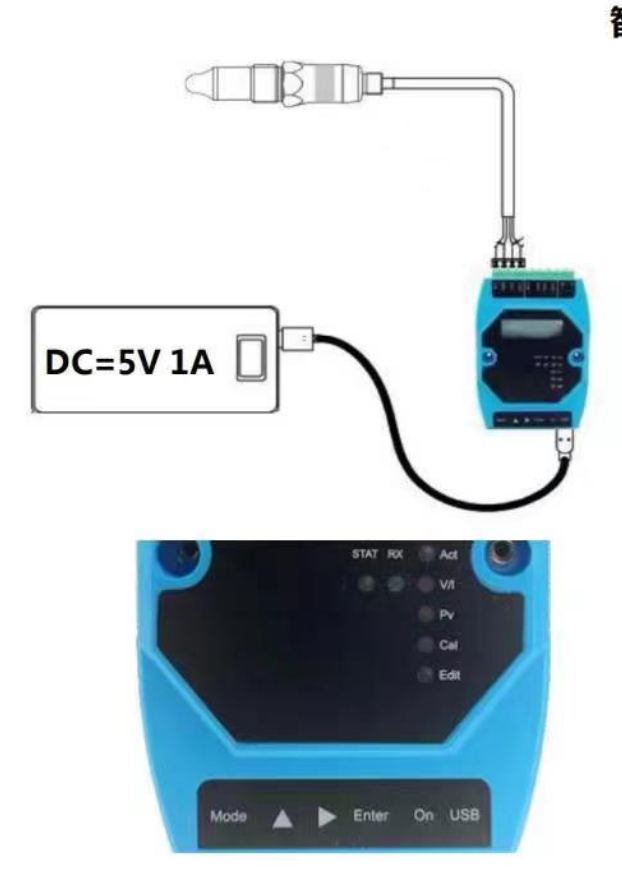
The smart switch detects different liquid levels and implements this by modifying the DK value. The following are the optimized operation instructions:


Step 1: Turn on the computer

  1. Connect to 5V 1A DC power supply (power bank or laptop).

  2. Press the black power button On, wait 5 seconds, and the screen will display UnLoc.

  3. Press Enter to unlock, YES is displayed, press Enter again, and the programmer starts to read sensor information.

  4. Wait for 16 seconds, the screen displays P1000 and 100+15 values ​​alternately (the sensor is empty and not in contact with the medium).

Step 2: Test the media DK value

  1. When the screen displays P1000 and 100+15 values alternately, insert the sensor probe into the measured medium.

  2. Observe the changes in the numbers displayed on the screen and record the highest DK value (the alarm value must be lower than this value to output the sensing signal).

  3. Example: water DK≈860, oil DK≈450, starch DK≈230.

Step 3: Modify the sensor control DK value

  1. Press the Enter key, and the screen will display nd letters and numbers alternately, indicating that the alarm DK value can be modified.

  2. The factory setting value of the sensor is generally 550, and the modification range is DK value x75% to 90%.

  3. Use the up/down keys to modify the ones, tens, hundreds, and thousands digits of the numbers respectively, and the left/right keys to modify the numbers 0-9.

  4. After adjusting the DK setting value, press Enter to confirm, then press YF5, then press Enter to confirm. The programmer starts to modify the parameters.

  5. Wait for 30 seconds, the screen displays nd letters and numbers alternately, and the displayed value is the modified DK value.

  6. When the STAT light is always on, the data has been saved, and the signal can be output by inserting the probe into the medium.

For example, the DK value of water is 860, and the alarm DK value is set to 860x(75-90%)=645~770. The smaller the value, the higher the sensitivity.

1679911016733.png


Our experts are ready to help Wherever you are, DOWESTON's experienced engineering team is ready to support your product selection and applications - contact us today!
Contact Us→

Copyright © 2019-2026 Doweston. All rights reserved.

Copyright © 2019-2026 Doweston. All rights reserved.
DOWESTON
Back to main page
Privacy settings Privacy settings